









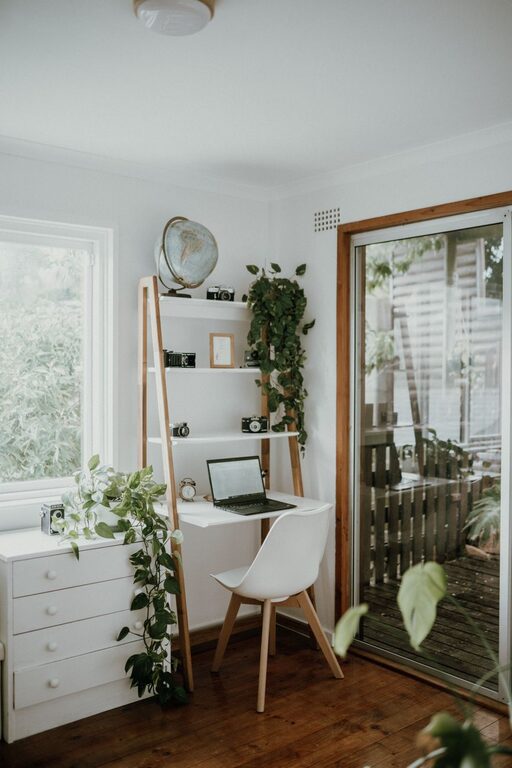
Creating a cozy and inviting home workspace is essential for productivity and well-being, especially as remote work and flexible schedules become more common. A thoughtfully designed workspace encourages focus, reduces stress, and makes daily tasks more enjoyable. Whether you have a dedicated office or a corner in your living room, this guide offers practical tips to help you build a comfortable and inspiring environment tailored to your needs.
Choose the Right Location
The first step in setting up a home workspace is selecting the right spot. Consider the following:
– Natural Light: Position your desk near a window to take advantage of natural light, which can improve mood and reduce eye strain.
– Minimal Distractions: Find a quiet area away from high-traffic zones and household noise.
– Space Availability: Make sure there’s enough room for your desk, chair, and any equipment or supplies you need.
If space is limited, look for underutilized corners, a nook behind a doorway, or even a spot near a bookshelf.
Invest in Comfortable and Functional Furniture
Furniture plays a big role in creating an inviting workspace. Comfort and ergonomics should be priorities to prevent discomfort and improve productivity.
– Desk: Choose a desk that fits your work style and space. Standing desks or adjustable desks offer flexibility, while a traditional desk works well for most setups.
– Chair: An ergonomic chair that supports your back and encourages good posture will make long work hours more comfortable.
– Storage: Incorporate shelves, drawers, or filing cabinets to keep your workspace organized.
Remember, comfort also comes from how your furniture is arranged. Ensure easy access to everything you need without overcrowding the space.
Add Personal Touches
Make the space feel uniquely yours by adding elements that reflect your personality and preferences. This helps create a warm and inviting atmosphere.
– Artwork or Photos: Display inspiring artwork or family photos to brighten the room and motivate you.
– Plants: Indoor plants add color, purify the air, and help reduce stress.
– Decorative Accessories: Use colorful cushions, rugs, or interesting desk organizers to enhance the space.
While it’s good to personalize, avoid cluttering your workspace. Keep items meaningful but minimal to maintain focus.
Optimize Lighting
Proper lighting is crucial for comfort and focus. Besides natural light, use a mix of lighting sources:
– Task Lighting: A desk lamp with adjustable brightness targets your workspace and reduces eye strain.
– Ambient Lighting: Soft overhead or floor lamps create a warm and inviting mood.
– Avoid Glare: Position screens and lights to reduce glare on your computer or documents.
Adjust lighting based on the time of day and tasks you are performing for the best results.
Keep It Organized
An organized workspace promotes efficiency and reduces stress. Here are some organization tips:
– Declutter Regularly: Remove unnecessary items and keep only what you use daily.
– Use Storage Solutions: Bins, trays, and drawer organizers help you store supplies neatly.
– Cable Management: Use clips, sleeves, or ties to keep cords tidy and out of sight.
– Daily Reset: Spend a few minutes at the end of each day tidying your area for a fresh start tomorrow.
Keeping your workspace clean and organized will make it more inviting and easier to focus.
Incorporate Technology Thoughtfully
Technology supports productivity but can also become a source of distraction if not managed well.
– Choose Quality Devices: Use reliable hardware that meets your work needs.
– Wireless Options: Where possible, opt for wireless keyboards, mice, and headphones to reduce cable clutter.
– Monitor Setup: Position your computer screen at eye level to prevent neck strain.
– Limit Notifications: Customize settings to minimize interruptions.
A streamlined tech setup helps maintain a smooth workflow and a calm environment.
Create Zones for Different Activities
If your space allows, organizing different zones can encourage productivity and creativity.
– Work Zone: Your primary desk area for focused tasks.
– Creative Zone: A small table or area for brainstorming, sketching, or planning.
– Relaxation Zone: A comfortable chair or corner for breaks and inspiration.
Even in small spaces, you can visually separate these zones using rugs, lighting, or furniture placement.
Maintain a Comfortable Temperature and Air Quality
Physical comfort contributes significantly to a cozy workspace.
– Temperature: Use fans, heaters, or window coverings to regulate temperature.
– Air Quality: Open windows when possible or use an air purifier to keep the air fresh.
– Humidity: Consider a humidifier in dry climates to maintain comfort.
Good air quality and comfortable temperature help you stay energized throughout your workday.
Establish Boundaries and Routine
Finally, creating a cozy workspace also involves setting clear boundaries and routines.
– Work Hours: Define your working hours to maintain work-life balance.
– Signal Boundaries: Use visual cues like closing a door or a “do not disturb” sign when you need focus.
– Breaks: Regularly step away from your workspace for short breaks.
This structure helps you associate your workspace with productivity and keeps distractions at bay.
—
Transforming your home workspace into a cozy and inviting place takes intentional effort but pays off with improved comfort and productivity. By choosing the right location, investing in quality furniture, personalizing wisely, and maintaining organization, you create a space that supports your work and well-being every day. Start small, and gradually adjust your setup until you find the perfect balance for your needs.